
We Asked 7 AI Image Models to Do Nothing. Every One Changed the Image.
The revealing image-editing prompt we tested was five words:
Do not change the image.
We gave the same product image and the same instruction to seven leading AI image editing models. The expected result was obvious: return the image unchanged.
Not one model did.
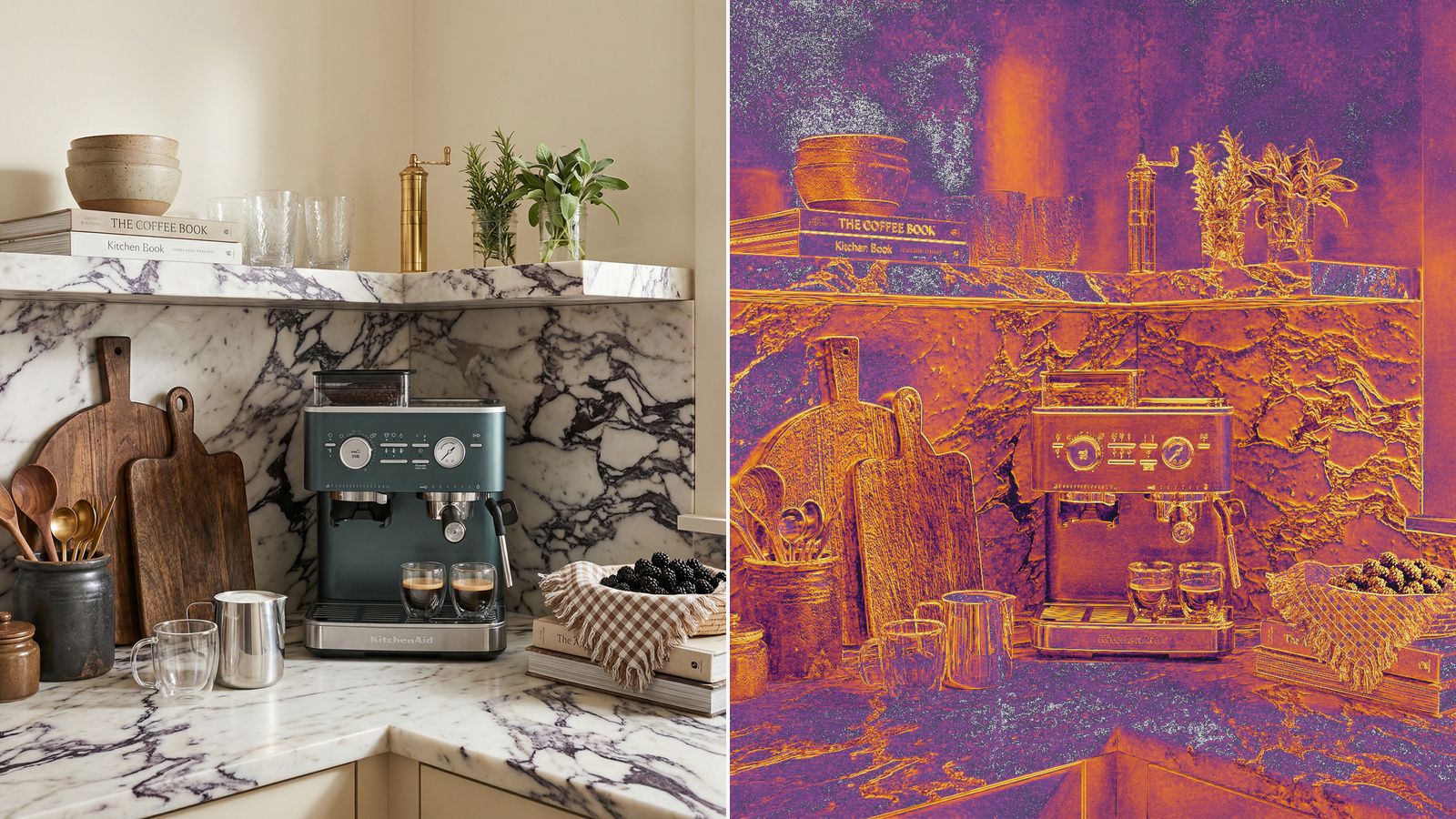
Every output introduced breaking differences. Text and symbols changed. Fine textures were regenerated. Reflections moved. Lighting shifted. In some cases, the geometry and composition drifted too.

*The source image, the ALL3D result, and the seven model outputs. Higher PSNR means greater similarity to the original.
“Do nothing” means something different to an image model
When you tell a coding model to do nothing, it can return no patch.
When you tell a text model to stop, it can produce no additional text.
That is the wrong mental model for generative image editing.
An image model returns an image. Regardless of the request, image models will generate a completely new image conditioned on the input image(s) and prompt. The result may look similar or even look nearly identical at first glance, but when you zoom in and take a closer look, the pixels tell another story.
For product imagery, that distinction matters.
The no-op test
Our source was a 2048×2048 lifestyle product image containing exactly the kinds of details that image-editing systems need to preserve:
- Small labels, logos, and control-panel symbols
- Marble and wood textures
- Glass and metal reflections
- Fine plant edges
- Soft shadows and lighting gradients
- Precise product geometry
We then measured similarity to the source using Peak Signal-to-Noise Ratio, or PSNR. A higher score means the result is closer to the original. A perfectly identical image has infinite PSNR.
Here is the ranking:

The ALL3D result combines Nano Banana Pro with our in-house models for preservation.

*Perceptual CIEDE2000 difference heatmaps. Darker areas are closer to the source; warmer colors indicate larger changes. Each heatmap is stretched independently to reveal its own differences, so use the PSNR score—not color alone—for comparisons between models.
Note: Nano Banana 2 Lite returned a 1024×1024 image; we resized it to the source canvas for scoring. The other primary outputs were 2048×2048.
This is not a general-purpose model leaderboard. It measures one narrow but important capability:
Can an image-editing system preserve an image when no edit is requested?
The errors hide in the details
Full-frame outputs can look deceptively similar when displayed at article or thumbnail size. The failures become much clearer when we inspect the product closely.


Look at the color of the espresso. Look at the subtle shift in perspective. Look at the contrast difference.
Subtle changes like this multiply as creative teams work towards getting the image just right, making it impossibly frustrating to use existing tooling.
The image remains photorealistic while becoming less accurate.
That is a dangerous failure mode because it is easy to miss during a quick visual review.
Every additional edit creates another opportunity for corruption
Most real image-editing workflows are iterative.
A user changes the background. Then they replace an object. Then they adjust the lighting. Then they revise the product placement.
The output of one edit becomes the input to the next. If a model redraws unrequested parts of the image on every turn, each step creates another opportunity for text, textures, geometry, and lighting to drift.
The degradation does not need to be dramatic in any single generation. Small changes can accumulate until the final asset no longer matches the original product or scene.
This is why “the output looks close” is not a sufficient quality bar.
The system needs to preserve what the user did not ask to change.
Our result
The raw Nano Banana Pro output scored 27.02 dB.
The ALL3D model result scored 42.70 dB, placing it well above every standalone model in this test.
An image model can generate the requested change. The editing system still has to protect everything else.
The simplest benchmark may be one of the most useful
“Do not change the image” sounds like a trivial test.
That is exactly what makes it valuable.
It removes creative interpretation, prompt-writing skill, and subjective preference. The model has one job: preserve the input.
All seven standalone models failed to return the original unchanged.
The lesson is not that generative image editing is unusable. The lesson is that a generated image should not automatically be treated as a faithful edit.
If exact text, product details, textures, geometry, and lighting matter, preservation has to be part of the image-editing system—not merely part of the prompt.
Before shipping an AI image editor, try the no-op test.
The result may tell you more than a hundred creative prompts.

Leave a Reply